Ok, hopefully someone will see what I’m doing wrong here, as I’ve tried a few different things and can’t get it to work right. I call this scene from other scenes, but the idea is if the porch lights are on between 7 AM and 7 PM it should turn them off. Otherwise, they can stay on (basically do nothing). The issue is when this scene is called, it always turns the lights off, no matter what time it is.
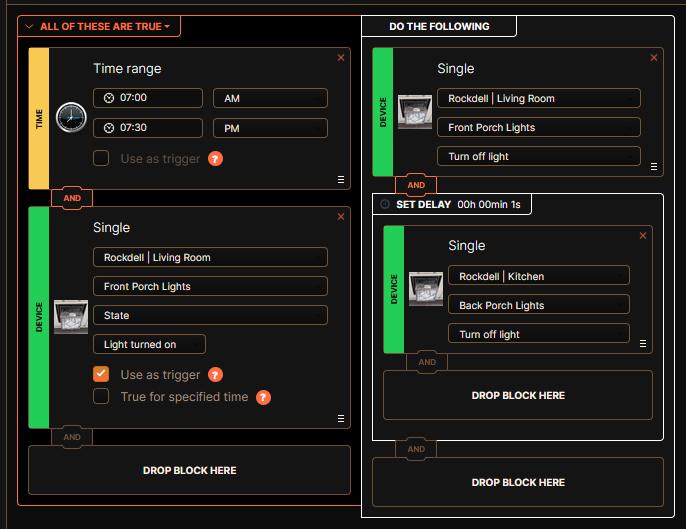
I think the problem is that when you add scene A (this scene) as an action of a different scene B, the conditions of scene A are not evaluated, just the actions. Similar to hitting the “Run” button when editing a scene – it executes the actions without evaluating the conditions.
I say “think” because I’m not positive, but this matches my experience.
That would be disappointing, but it would make sense. I hope that’s not the case though. It should run the entire scene as is. That would make the most sense.
Yes, that’s correct.
Have a global variable that Scene A trips and then have this scene use the variable to determine the action!
1 Like
A global Event is a good choice, as you don’t then need to reset the variable after turning the lights off. 
Out of curiosity, what’s the rationale for the 1s delay between turning off the two lights? Did you find that to be more reliable? (I ask because I have some outdoor landscape lights and some coach lights on the garage–three in total–that occasionally don’t all turn on at the appropriate time.) 
I can’t answer for OhioYJ, but a year ago things with the ZBox were somewhat unstable due to some firmware issues. One of the chronic problems I had was that not all devices in an action would be appropriately acted on. Splitting up the devices into groups with some delays between helped a bit.
Ultimately, the firmware updates solved the underlying problem and now I have scenes that trigger actions on some 15-20 devices all at the same time without issue.
1 Like
I have some scenes where they could be turning off 20 lights in some cases. I found this wasn’t happening reliably (some lights would get missed). My theory was it was sending them out almost all at once, and something was getting lost. So I started adding a delay in between commands to give things a chance to react / respond if need be. The delay seemed to cure things and everything worked reliably again.
My firmware on all devices is up to date.
1 Like
Note that this was the ZBox Hub, not any devices. Just mentioning in case you never updated your hub! I’m currently running 5.180.17. See Frequent device disconnects with ZBox Hub - #9 by zoozer
– Chris
2 Likes
Definitely appreciated. I keep my hub updated too though.
Thanks, guys! I had forgotten about the hub update (I’m running the current Beta release; no problems so far I haven’t already seen  ) and suspected as much about the delay.